โปรแกรมPC
รวมสินค้าโปรแกรมคอมพิวเตอร์มากมาย
-------------------------------------------------------------------------------------------------------------------------------------------------------------------------------------------
Ashampoo® Burning Studio 9 
 Now with video editing and many new features

Ashampoo Burning Studio 9 is a major update that improves almost every aspect of the program, adding many new features and capabilities in every part of the program. It also introduces a new Movie Editor for editing and combining your videos before burning them to DVD. The Movie Editor has functions for cutting, transitions, fades, subtitles, titles and more, plus a point-and-click DVD menu editor with animated themes for creating great-looking interfaces for your DVD movies.
The new version also packed with improvements, new features and fine tuning that make all Burning Studio’s functions more powerful and even easier to use.

รหัส p-pc023
ราคา 75 บาท
..............................................................................................................................................................................................
--------------------------------------------------------------------------------------------------------------------------------------------------------------------------------------------
Ashampoo Burning Studio 8 With Label Designer, animated DVD Slideshows and QuickTime support

โปรแกรมบันทึกข้อมูลลง CD DVD BL-D ที่ดีที่สุด ในปี2008 ว่ากันว่าดีกว่า นีโร ด้วย เรื่องจิง ทีมงานมีการทดสอบแล้วคับดีจิง..........
The complete, compact and easy burning suite
Does your burning software do everything but you can’t find anything? Did installing it take up several gigabytes of hard drive space and fill up your Taskbar? Ashampoo Burning Studio 8 is different. It's compact, fast and amazingly easy to use. You just choose from a list of tasks and the software guides you through every step. And even though it has all the functions you would expect from a complete burning suite, the entire software takes up less than 85 megabytes on your hard disk.
Buy Now ($49.99) ราคา ต่างประเทศ
รหัส p-pc001 ราคา 50 บาท (ราคาคนไทย)

Ashampoo Burning Studio 7 Now with Video, Bootable Discs and MP3 Ripping.

Choose Format. Select Files. Burn Disc.
เหมาัะสำหรับ คอมความเร็วน้อย ดีไม่แพ้ รุ่น 8 เลย
Since its initial release, Ashampoo Burning Studio has changed the way CD/DVD/Blu-ray burning software works. Instead of spending frustrating hours learning how to use hundreds of complicated functions you just select a task – for example “Burn Files”, “Backup Files” or “Burn Movies” – and then the program guides you through all the necessary steps. You just choose your format, select your files and burn your disc. It really is that easy, but easy doesn’t mean you get less functionality: Advanced burning functions are also available for experienced users who want to choose specific file systems or use special boot images.
รหัส p-pc002 ราคา 35 บาท
----------------------------------------------------------------------------------------------------------------------------------------------------------------------------------------------
Ashampoo DVD Theme Pack 1Additional DVD menu templates for Ashampoo Burning Studio and Ashampoo Movie Shrink & Burn 3

รหัส p-pc002-2 ราคา 25 บาท
รูปแบบส่วนเสริม สำหรับ รุ่น 7/8
แต่งภาพส่วยกว่าเดิม
New professional menus for home-burned video DVDs
The new Ashampoo Burning Studio and Ashampoo Movie Shrink & Burn 3 are the perfect programs for movie-lovers. These easy-to-use programs burn movies in a variety of file formats onto a classical video DVD which can then also be played in your own home theater. The software already includes a great number of templates for editing a professional DVD menu. If you want to have an even wider selection when editing your own film DVDs, Ashampoo now also offers the Ashampoo DVD Theme Pack 1. It contains ten additional menus which will bring even more variety to the presentation of your films.
-----------------------------------------------------------------------------------------------------------------------------------------------------------------------------------------------
3000 Fonts

รหัส p-pc003
ราคา 50 บาท
.............................................................................................................................................................................................
ClubDJ (ProDJ) 2.2.4.1
 M u l t i MediaMix better. Mix faster. Mix with ease.Equipped with ClubDJ PRO's enhanced Audio Mix Engine, and an extensive array of product features; ClubDJ (ProDJ) offers disk jockeys a powerful digital solution. Plus, ProDJ's development platform offers superior stability and mixing performance that you require each and every night. Loaded with dual interactive waveform displays, real-time BMP detection, MIDI controller support, manual beat-matching, tempo & pitch shifting, custom looping, plus many more great features are all at your finger tips. Mixing with pinpoint precision has never been so easy.
Interactive Waveform Displays: Each Waveform Display shows frequency bands in real-time, enabling you to anticipate each beat & break in advance. Plus, match the beats, custom loop and set cue points using this interactive display.
Complete Crossfade Control: (ProDJ) gives you the most complete crossfade control of any DJ software. 4 Timeline-Fade-Presets, or manually adjust the "Visual Crossfade Controller" for complete control. Plus, use the "Mix Now!" button for mixing the current track with next one at any time.
Eay-to-use Interface: Sophisticated & easy-to-use design allows you to execute quickly on the fly, with pin-point control (tempo, pitch, pitch bend, play, pause, position, set cue points, add sound effects, custom looping, quick media search, save playlists... the list goes on).
Find the right track, right now: Quick Search allows you to scan through thousands of media tracks in mere seconds. Browse by artist, title, album, BMP, length, year or genre for immediate mixing, or organize your tracks into savable play-lists.
Audio Formats: MP3, MP2, MP1, OGG, WMA, WAV, audio CDs (CDA), MOD music (XM, S3M) and now M4A (for iTunes).
รหัส p-pc004
ราคา 50 บาท
---------------------------------------------------------------------------------------------------------------------------------------------------------------------------------------------------

ImTOO MPEG Encoder Ultimate v5.0
โปรแกรมแปลงวีดีโอ
รหัส p-pc005
ราคา 50 บาท
..............................................................................................................................................................................................
Ashampoo ClipFinder HD 2.04 โปรแกรมดูvdo จากyoutube
 The ultimate clip browser with a breathtaking video wall and MP3 conversion from videos!
Find, view, save and convert web videos in HD or SD! The brand-new Ashampoo ClipFinder HD gives you web video the way it should be. Search in up to fifteen video portals at once or in selected portals, view videos directly and convert and save them to your hard disk with a single click. Nothing makes finding, viewing, saving and managing web videos easier. And Ashampoo ClipFinder HD isn’t just better, it’s also still completely free. CNET’s reviewers called the original ClipFinder “a breath of fresh air” among programs of this type and the new ClipFinder HD is even better and more powerful.
ClipFinder HD is a like a 3D web browser. You just enter search words in the Search bar and the search results from up to 15 video portals are displayed as clip thumbnails in the 3D Video Wall. You can search selectively in just some portals, just one portal or all portals. You choose. You can also create multiple searches in different tabs and switch between the results.
Click on a clip to play it, click again to save it to your hard disk and convert it while your saving. Zoom the video while you’re playing by turning the mouse wheel, another click plays in full screen mode with popup controls.
Navigating in the 3D Video Wall is amazing: Zoom in on clip previews with the mouse wheel, drag to scroll up and down and from side to side, point to a clip to see information, change the order and layout by dragging. In the 3D Video Wall interface it’s like walking around in your own boutique full of videos. Users who prefer the classic scrolling interface can activate it if they want, of course. Organizing your saved clips is just as easy. Just define categories, put your clips in them and navigate them in the 3D Video Wall and organize them by dragging with the mouse.
รหัส p-pc006
ราคา 60 บาท
..............................................................................................................................................................................................
ProShow Gold โปรแกรมทำสไลด์โชว์สวยระดับเทพ
ProShow Gold

 |   |
ProShow Gold 4.0 โปรแกรมทำสไลด์โชว์ที่จะเอารูปถ่ายของเรามาทำเป็นภาพแบบสไลด์โชว์ไว้ดูผ่านหน้าจอคอมพ์หรือหน้าจอทีวีก็ได้เพื่อ ความบันเทิงภายในบ้านแทนการเปิดอัลบั้มภาพแบบเก่าๆ ที่ดูได้เพียงไม่กี่คน โดยโปรแกรมนี้ใช้งานง่ายมากครับแต่ผลงานที่ออกมาสวยจนต้องอึ้งยังกับศิลปิน ทำเชียวแหละ.

Share your most precious memories with the award-winning ProShow Gold slide show software. Easily combine your photos, video clips, and music to create personalized slide shows to share with friends and family in your living room or across the world. See what’s new in 4.0.
รหัส p-pc007ราคา 70 บาท
..............................................................................................................................................................................................
ProShow Producer
โปรแกรมทำสไลด์โชว์สวยระดับมืออาชีพ


ProShow Producer Screenshots
 |  |  |
Main Screen | Transitions | Multiple Layers |
 |  |  |
Motion Keyframing | Branding Options | Audio Trimmer |
 |  |  |
Show Options - Watermark | Output Options | Menu Options |
ราคา 80 บาท
..............................................................................................................................................................................................
Xilisoft Video Converter แปลงวิดีโอระดับเทพ

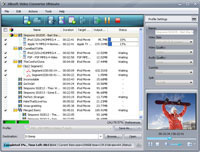

Incredibly easy to use for both novices and pros alike, Xilisoft Video Converter has all the capabilities to give you a product with outstanding quality: convert videos of all popular formats like AVI, MPEG, WMV, DivX, MP4, H.264/AVC, AVCHD, MKV, RM, MOV, XviD, 3GP, etc., transform between MP3, WMA, WAV, RA, M4A, AAC, AC3, OGG audios, and create fascinating videos from photos. The luxuriously optimized profiles provided by this video converter make it possible to watch movies and listen to music on PSP, PS3, iPod, IPhone, Apple TV, Xbox and other digital devices.
The video converter also offers additional ingenious features of clipping, cropping and adjusting effects, adding subtitles and watermark to assist you to enhance movie effects and create more featured movies. Just download Xilisoft Video Converter for free to relieve you of tiresome and time-consuming video conversion tasks.
- Convert video of all popular formats with HD video conversion supported
- Convert among audios like MP3, WMA, WAV, AAC and so on
- Convert video to iPod, iPhone, PSP, PS3, Xbox, mobile phone, MP4 players
- Edit video, clip, merge, split, add watermark and special effects
รหัส p-pc009
ราคา 60 บาท
..............................................................................................................................................................................................
Xilisoft Media Toolkit Ultimate สุดยอดแปลงวิดีโอระดับเทพ
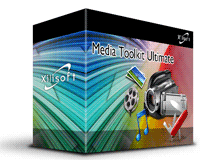

Consisting of five splendid products: DVD Ripper Ultimate, Video Converter Ultimate, DVD Copy Express, DVD Creator, and Audio Maker, Xilisoft Media Toolkit Ultimate helps you rip/convert DVD movies, convert among various video formats(include High Definition videos), copy and backup your DVD movies, create DVD from various video files, convert between audios, rip CD to audios and burn music CD from audio files.
Whatever multimedia devices you own and wherever you want to enjoy videos and music, once you own this Media Toolkit Ultimate, you can always put any DVD movies, videos and music on PSP, PS3, iPod, iPhone, Apple TV, Zune, Archos, mobile phone, or any MP4/MP3/DVD/CD players for relaxing enjoyment.
Xilisoft Media Toolkit Ultimate brings you amazing DVD ripping, video and audio converting, DVD copying, DVD creating, CD ripping and burning experience to enhance your multimedia life.
รหัส p-pc010ราคา 90 บาท
..............................................................................................................................................................................................
ImTOO MPEG Encoder Ultimate
mTOO MPEG Encoder | AVI MPEG Converter 3GP Video Converter PSP Video Converter iPod Video Converter Zune Video Converter |
| ImTOO MPEG Encoder is powerful MPEG converter software which can easily convert AVI to MPEG, convert MPEG to iPod, convert WMV to MPEG. etc. The MPEG Encoder not only supports converting among all mainstream video files such as AVI, MPEG, DivX, WMV, MP4, MOV, FLV, 3GP, PSP MPEG-4, iPod MPEG-4, etc., but also provides easy and fast ways to extract audio from video files, convert among all audio formats like MP3, WMA, WAV, AAC, M4A, etc. | |


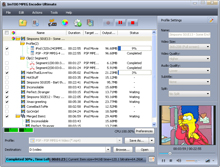 |
|
รหัส p-pc011
ราคา 60 บาท
..............................................................................................................................................................................................
Frame Photo Editor โปรแกรมแต่งภาพ
rame Photo Editor - Easily Edit & Decorate Your Photos, Make Your Pictures Unique
Frame Photo Editor edit & decorate your photos for you with a few mouse click. With it, you can easily blend your digital photo onto another picture or photo. Apply artistic effects to your photos with Framing & Edging effects. You can also add flowers, cartoon pictures onto your pictures with it. Titles and captions are just as easy to add.
Decorate photos YOUR way, but do it all for you
Are you looking for a photo editor that would let you do the work YOUR way, but do it all for you? Frame Photo Editor is the answer.
No need to know a lot about digital photography and computer graphics to understand Frame Photo Editor. With it, you could make your photos beyond impressive easily. With, you could decorate pictures and edit photos like a pro!
Makes your photo unique
With a few mouse clicks, you can generate an attractive picture with Frame Photo Editor. It provides a lot of items you could use in your pictures, such as flowers, cartoon pictures, frames. And we'll provide more in the future.

Overview
Frame Photo Editor is an easy to use photo editing software. You can add cool frames to your photos very quickly and easily. Resize, rotate, adjust color and add text to your pictures. Then you can mail to your friends or set as your desktop wallpaper. So, it can also enhance your desktop. Frame Photo editor makes you working with your digital photos as easy as possible!
With Frame Photo Editor, you can easily enhance your photo effects by blending your digital photos onto another image. The photo will be masked as special effect which you can select from a lot of masks that Frame Photo Editor provides. You can also easily add cool frame, pretty flowers and cartoon clips onto your pictures. And you can insert text into pictures with speech frame. It makes your photo more interesting and attractive.


You can easily change the size and position of the photos, flowers, cartoon pictures or text just by clicking and dragging them. You can even rotate the mask or the photo just with your mouse moving.
After having edited pictures with Frame Photo Editor, you can print them, email them, or set as your Desktop Wallpaper. You may also upload onto website, your album on Internet etc. It's also a photo album page maker.
รหัส p-pc012
ราคา 60 บาท
..............................................................................................................................................................................................
Nature..Illusion..Studio | |||||||||
| |||||||||
| |||||||||


รหัส p-pc013
ราคา 60 บาท
..............................................................................................................................................................................................
PhotoInstrument 2.5 โปรแกรมแต่งหน้าใสมากๆๆ
An easy to learn tool for editing and retouching photosScreenshot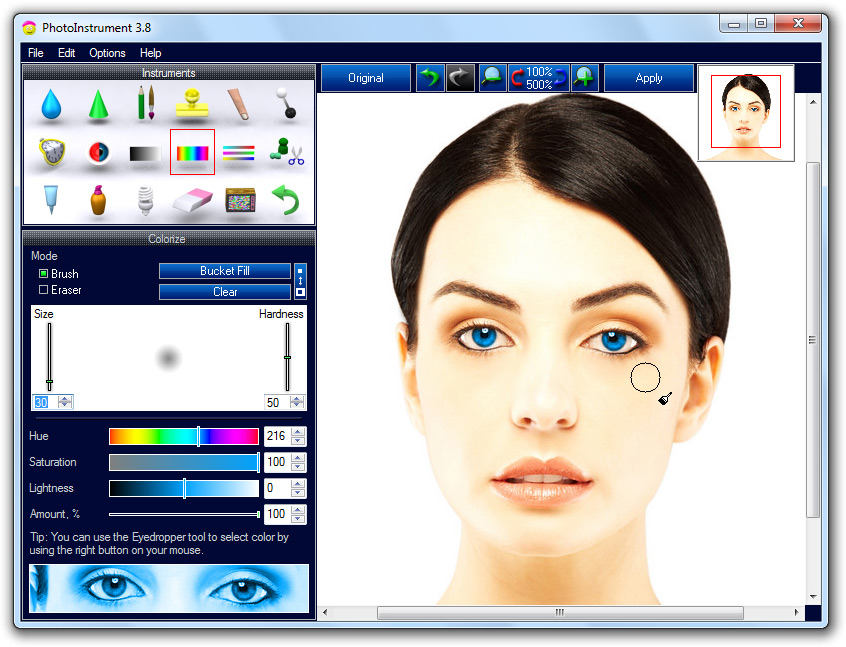
Take a look at some examples below. So easy to use that anyone can apply these changes. My mom, who is not computer savvy, spent just 10 minutes and made these edits. Download PhotoInstrument for free and you can see short videos how this samples was created.






รหัส p-pc014
ราคา 90 บาท
..............................................................................................................................................................................................

รหัส p-pc015
ราคา 90 บาท
..............................................................................................................................................................................................
Photo Manager 2009
รหัส p-pc016
ราคา 90 บาท
..............................................................................................................................................................................................
 | |||
 |
|
รหัส p-pc017
ราคา 50 บาท
..............................................................................................................................................................................................
FastStone Capture จับและบันทึกภาพ/วีดีโิิอ บนหน้าจอคอม
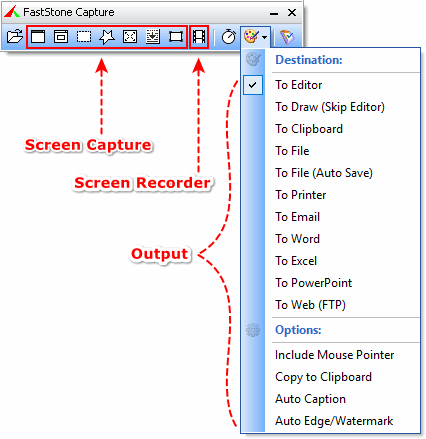 | FastStone Capture is a powerful, lightweight, yet full-featured screen capture tool that allows you to easily capture and annotate anything on the screen including windows, objects, menus, full screen, rectangular/freehand regions and even scrolling windows/web pages. You can choose to send captures to editor, file, clipboard, printer, email, Word/PowerPoint document or upload them to your website. Editing tools include annotating (texts, arrowed lines, highlights), resizing, cropping, sharpening, watermarking, applying edge effects and many more. It also allows you to record screen activities and sound into highly compressed video files. Other features include global hotkeys, automatic filename generation, support for external editors, a color picker, a screen magnifier and a screen ruler. FastStone Capture saves files in BMP, GIF, JPEG, PCX, PNG, TGA, TIFF and PDF formats. | ||
รหัส p-pc018
ราคา 50 บาท
..............................................................................................................................................................................................
โปรแกรมแปลงไฟล์มัลติมีเดียสารพัด Media Convert Master v8.1.1.2

Media Convert Master is a professional video converter, you can convert your video and audio files from one format to another. It supports multiform convert formats including AVI, MP4, 3GP, MPEG, MOV, WMV, RM, SWF, AAC, AC3, MP2, MP3, AMR, WAV, VOB and ASF. It is extremely professional converting software with fast conversion speed and high quality. It can let users enjoy their video converting
Main Functions:
Video Conversion
Audio Conversion
Features List:
It can convert all formats to AVI, MP4, 3GP, MPEG, MOV, WMV, BM, SWF, AAC, AC3, MP2, MP3, AMR, WAV, VOB and ASF.
Adjustable edit profile to add or delete formats at your will.
Batch convert video formats.
Supports any video formats user defined as the output.
You can customize video profiles video and parameters for output video.
Step by Step
How to convert a file:
1. Click “Open” button to add the video files that you want to convert.
2. Click the desired Main Panel button to select a target format that you want to convert to.
3. Then click “Edit Profile” button to customize profile properties.
4. Set a valid output directory to save converted files before start converting. Click “Browse” button to select desired output directory or write valid output directory manually.
5. Click the “Convert” button to start your converting. There will be a new file in your selected output directory.
Supported Formats:
AVI, MP4, 3GP, MPEG, MOV, WMV, RM, SWF, AAC, AC3, MP2, MP3, AMR, WAV, VOB and ASF
รหัส p-pc019
ราคา 60 บาท
..............................................................................................................................................................................................
Adobe Audition 3 สุดยอดแห่งดนตรีทำได้หมด
เช่น ลบเสียงคนร้องได้กลายเป็น karaoke
Sound your best
Recording, mixing, editing, and mastering — Adobe® Audition® 3 software is the all-in-one toolset for professional audio production.
Use Adobe Audition 3 to:
- Create your own music
- Record and mix a project
- Produce a radio spot
- Clean up audio for a movie
- Compile and edit a soundtrack
Whatever you do with audio, Adobe Audition 3 software helps you sound your best.

Adobe Audition 3
- Buy from US$349
- Upgrade from US$99
- Update: Audition 3.0.1 patch available
Top features in Adobe Audition 3
VSTi virtual instrument support
Enjoy support for a wider range of virtual instruments. Simply add a MIDI host track to your mix, choose an instrument, and then record new audio in the Sequencer.
Improved multitrack editing
Save time and increase accuracy by editing grouped clips together. Auto-crossfade clips in multitrack view to quickly mix files together. Click-and-drag fade handles on multitrack clips and in the Edit View for faster editing.
Enhanced spectral editing
Make a free-form selection in frequency space with the Effects Paintbrush and apply effects in varying degrees to that selection. Smooth over a selected region to automatically repair clicks, pops, and other noises using the Spot Healing Brush.
Top/Tail Views
Need a quick and easy way to tweak the start and end of a loop or other audio file? The new Top/Tail Views allow you to zoom into the beginning and end of a file so you can quickly add precise fades while keeping the whole file in view.
New effects
Adobe Audition 3 includes new effects such as Convolution Reverb, Analog Delay, Mastering tool, Guitar Suite, and Tube-modeled Compressor.
Superior performance
Get superior performance and take advantage of the new multicore processors. The optimized mix engine allows for more tracks and effects on the same machine, offering more variety and faster processing.
Adobe Audition or Soundbooth?
Both Adobe Audition and Adobe Soundbooth® CS4 audio software are designed for high-quality results. But which one is right for you?
Buy Adobe Audition if:
You are a sound designer, musician, recording engineer, mastering engineer, or other audiocentric professional and you need an all-in-one toolset for professional audio production.
Buy Adobe Soundbooth if:
You are a designer or developer with little or no background in audio and you need an intuitive, easy-to-use software tool to help you quickly accomplish everyday audio tasks.
รหัส p-pc020
ราคา 90 บาท
..............................................................................................................................................................................................
Lock Folder XP ล็อกข้อมูลไม่ให้ใครเห็นนอกจากท่าน | ||
 | ||
Features
Note: Lock Folder XP does not change the file structure of the data, does not move the protected data, and does not change Windows system files. You cannot lose your files. DescriptionVersion: 3.6 Screenshot
|

รหัส p-pc021
ราคา 50 บาท
..............................................................................................................................................................................................
Ashampoo® Photo Commander 7 3D Acceleration, Panoramas and Virtual Albums

View, manage, organize and edit your digital media in one intuitive and powerful program.
Ashampoo Photo Commander 7 is an all-in-one application for organizing, editing, sharing and presenting photo collections with additional audio and video playing and management capabilities.All the photo editing tools you need are included. Enhance your images with the one-click optimizer. Remove the red-eye effect, adjust colors, contrast, hue and many other parameters, resize, crop, rotate, add a wide range of special effects.
After editing you can then use the integrated creativity tools to turn your photos into slide shows with music, web albums, photo collages, calendars and more.

What’s new in version 7
There are far too many improvements to list them all – we can only include the highlights here:3D hardware acceleration
The program now automatically uses the 3D processor in your computer’s video card to achieve a performance boost. If you have a 3D video card this significantly speeds up photo viewing and transition effects for smoother resizing and zooming, with additional smoothing for less “jaggy” images at high magnifications.
New, more efficient media database
The new automatic database that manages your media files is now both faster and more efficient, automatically updating when you’re uploading your media files on your PC. This means you can move files around without losing their tags (star ratings) and other data. The new database also makes scanning EXIF photo tags and MP3 audio tags much faster.
Drag & Drop virtual albums
The new Drag & Drop virtual albums (Favorites) organize your media files in folders without actually moving them – the same files can be included in multiple folders without creating multiple copies of the files. You can manipulate the files in virtual albums just like any other group of files: Add tags and star ratings, perform batch cut and crop operations, create slide shows and web albums and so on.
Create panorama images
This is a feature that many users have asked for. In version 7 you now have a tool for stitching together multiple photos to create a single large panorama image.Slide shows with “Ken Burns” effect
The new quick slide show features the popular “Ken Burns” effect that zooms and pans on each image while it is being displayed. Just select the photos you want to include and press Ctrl+Space to start.
รหัส p-pc022
ราคา 65 บาท
..............................................................................................................................................................................................


ไม่มีความคิดเห็น:
แสดงความคิดเห็น